How to Choose the Right CPU Heatsink for Optimal Cooling Performance
Choosing the right CPU heatsink is crucial for ensuring optimal cooling performance for your computer system. With a plethora of options available in the market, it can be overwhelming for consumers to determine which heatsink will best suit their needs. Renowned thermal management expert Dr. Emily Chen once stated, "Selecting a CPU heatsink is not just about aesthetics; it's about maintaining the integrity and performance of your system's components." This highlights the importance of understanding the various factors that contribute to effective cooling solutions.
In the world of CPUs, overheating can lead to throttling, reduced performance, and even permanent damage. Therefore, investing in a suitable CPU heatsink is essential. Various aspects, such as material composition, size, and airflow, play a significant role in the efficiency of a heatsink. For gamers and professionals alike, the right heatsink can mean the difference between smooth operation and frustrating performance dips. Thus, navigating through the selection process with insight and expertise is key to making an informed choice.
In this article, we will explore the critical elements to consider when choosing a CPU heatsink, empowering you to make decisions that will enhance your system's longevity and performance. With the right information at hand, you can ensure that your CPU remains cool under pressure.

Understanding the Importance of CPU Cooling in Computer Performance
Effective CPU cooling is crucial for maintaining the overall performance of a computer system. As processors become more powerful, they generate increasing amounts of heat. According to a report by the International Thermal Management Society, improper cooling can lead to temperature spikes that may degrade CPU performance by as much as 30% under load. This thermal throttling not only affects the speed at which tasks are completed but can also lead to hardware longevity issues, making adequate cooling a necessity for both gamers and professionals relying on high-performance computing.
Furthermore, studies from the Electronics Cooling Journal indicate that maintaining optimal CPU temperatures can significantly enhance reliability and stability. The recommended operating temperature for most CPUs is generally between 70°C and 80°C, with a maximum threshold around 90°C. Running at or below these temperatures allows for sustained performance while minimizing the risk of thermal-induced failures. In environments where overclocking is common, keeping the CPU cool becomes even more critical, as increased clock speeds can swiftly elevate temperatures, amplifying the need for efficient heat dissipation solutions. Ultimately, understanding the importance of CPU cooling empowers users to make informed decisions when selecting heatsinks that align with their performance needs.
Key Factors to Consider When Selecting a CPU Heatsink
When selecting a CPU heatsink, several key factors must be taken into account to ensure optimal cooling performance. First and foremost, the thermal design power (TDP) rating of your CPU should guide your choice. TDP indicates the maximum amount of heat that a CPU can generate under load, and it is critical to choose a heatsink that can efficiently dissipate this heat. An underpowered heatsink may lead to overheating, resulting in thermal throttling or even damage to the CPU.
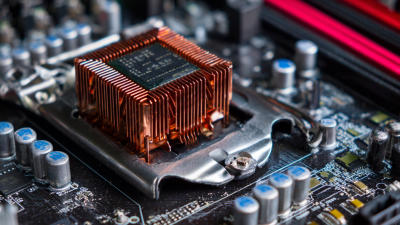
Another important factor is the physical size and compatibility of the heatsink with your CPU socket and case. Heatsinks come in various shapes and sizes, and ensuring a fit is crucial for both thermal efficiency and installation convenience. Additionally, airflow plays a significant role in cooling performance; therefore, consider the layout of your case and the presence of fans to facilitate effective airflow around the heatsink. A well-placed heatsink with a good fan setup can significantly enhance heat dissipation. Finally, the material used in the heatsink, such as copper or aluminum, can also affect thermal conductivity and overall performance, making it important to consider when making your selection.
Types of CPU Heatsinks: Air vs. Liquid Cooling Solutions
When selecting a CPU heatsink, understanding the difference between air and liquid cooling solutions is crucial for optimal performance.
Air cooling is the traditional method, utilizing a combination of a heatsink and one or more fans. It works by dissipating heat away from the CPU into the surrounding air. A well-designed air cooler can effectively handle heat generated during heavy processing, making it a popular choice among gamers and general users alike. The advantage of air cooling lies in its simplicity, ease of installation, and lower maintenance requirements. Additionally, air coolers tend to be more affordable compared to their liquid counterparts.
On the other hand, liquid cooling solutions offer enhanced heat dissipation, making them ideal for overclocking enthusiasts or users who demand high performance from their systems. Liquid cooling systems use a water block to carry heat away from the CPU to a radiator, where fans then cool the liquid before it recirculates. This method allows for more efficient cooling and can often lead to lower temperatures than air solutions. However, liquid cooling typically requires more complex installation and maintenance, as well as careful consideration of potential leakage. Users must weigh the benefits of superior cooling against the need for meticulous setup and upkeep when deciding which cooling solution is right for their needs.
Evaluating Heatsink Compatibility with Your CPU and Case
Choosing the right CPU heatsink is crucial for maintaining optimal cooling performance, especially when considering compatibility with your CPU and case. Before making a decision, it’s essential to check the dimensions and mounting system of both the CPU socket and the heatsink. Many popular CPUs employ specific socket types, such as LGA 1200 or AM4, which require heatsinks designed specifically for their dimensions. According to a recent industry report, mismatched heatsink compatibility can lead to thermal throttling, reducing CPU performance by up to 20% during peak operations.
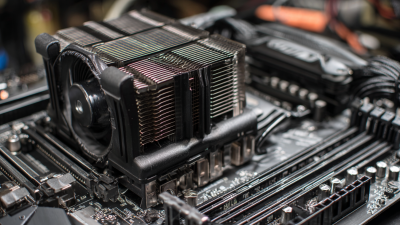
When selecting a heatsink, also consider the airflow within your case. A heatsink that is too tall may interfere with RAM slots or obstruct airflow to other components. Measure the available space in your case and ensure that the heatsink’s height is suitable for your setup. Additionally, opting for a heatsink with a fan that suits your case’s airflow design is vital. A well-ventilated case with a balanced intake and exhaust system can help the heatsink perform at its best.
Tips: Always check the manufacturer's specifications for both your CPU and heatsink. This can save you considerable time and headaches later. Additionally, apply thermal paste properly to ensure maximum heat transfer efficiency between your CPU and the heatsink. Lastly, consider user reviews and benchmarks that discuss thermal performance specific to your pairing for an informed decision.
Tips for Installation and Maintenance of CPU Heatsinks for Longevity
Proper installation and maintenance of CPU heatsinks are crucial for ensuring optimal cooling performance and longevity of your system. When installing a heatsink, start by ensuring that the CPU surface is clean. Use isopropyl alcohol to remove any old thermal paste before applying a new, high-quality thermal compound. Apply the thermal paste sparingly—too much can impede heat transfer. Position the heatsink carefully and secure it according to the manufacturer’s instructions to avoid any damage to the CPU or the socket.
Regular maintenance can significantly extend the life of your CPU heatsink. Dust accumulation can hinder airflow and decrease cooling efficiency. Therefore, it’s advisable to inspect and clean the heatsink every few months. Use compressed air to blow out dust from the heatsink fins and fan blades. Additionally, monitoring the temperature of your CPU can help you determine whether your cooling system is functioning effectively. If you notice consistently high temperatures, consider reapplying thermal paste or checking for any obstructions in airflow. By following these tips, you can ensure your CPU stays cool and operates efficiently over time.






 Mr. Perry Wu International Sales Director