How to Choose the Right CPU Heatsink for Your Computer?
Choosing the right CPU heatsink is crucial for optimal computer performance. John Doe, a renowned CPU heatsink expert, emphasizes, "The right heatsink can make or break your system's stability." A proper heatsink ensures that your CPU doesn’t overheat, which can lead to reduced longevity and unexpected failures.
When selecting a CPU heatsink, many factors come into play. Compatibility with your CPU socket, airflow design, and thermal performance are essential aspects to consider. It’s easy to overlook these details. Some users might simply pick the most visually appealing option. However, this could lead to ineffective cooling.
Budget is another concern. High-end CPU heatsinks often promise amazing performance but can strain your wallet. On the other hand, cheaper options may not provide adequate cooling, risking potential damage to your CPU. Assessing your needs and balance is vital. In the world of CPU heatsinks, the right choice truly matters.

Understanding CPU Heatsinks and Their Importance
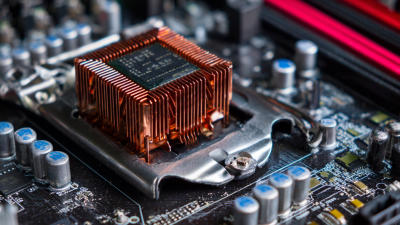
Choosing the right CPU heatsink is crucial for maintaining optimal performance in your computer. A heatsink dissipates heat generated by the CPU during operation. Without it, your system might overheat, leading to unexpected shutdowns or damage. The material and size of the heatsink play significant roles in its efficiency. Aluminum heatsinks are lightweight and affordable, while copper options provide better thermal conductivity.
When selecting a heatsink, consider your CPU's cooling requirements. It’s important to balance size with airflow. A large heatsink may not fit in compact cases. Additionally, not all fans provide the same cooling performance. Sometimes, noise becomes an issue as larger fans can be louder. Evaluate your specific needs, as stock solutions often fail to provide adequate cooling under heavy load.
Remember, installation matters. A poorly placed heatsink can lead to thermal throttling. Also, thermal paste application requires attention. Too little or too much can hinder heat transfer. This process is often overlooked but vital for the heatsink's performance. So, take your time to understand your system's needs before making a choice. There’s always room for improvement in this area.
Factors to Consider When Choosing a CPU Heatsink
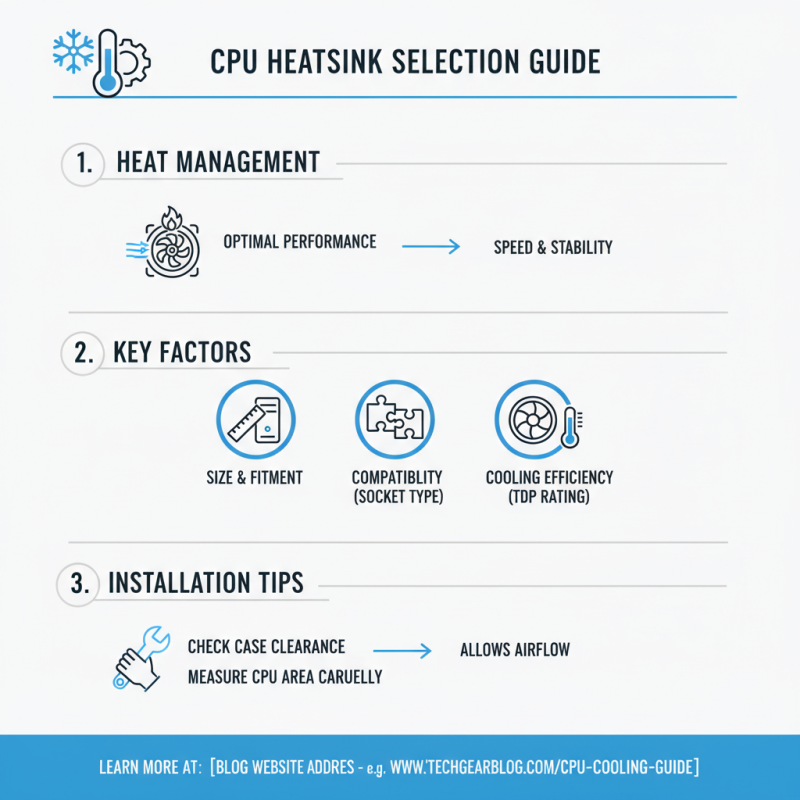
Choosing the right CPU heatsink is crucial for maintaining optimal performance. Heat management directly affects your computer’s speed and stability. When selecting a heatsink, consider factors like size, compatibility, and cooling efficiency. The heatsink must fit within your case while allowing for airflow. Measure the space around your CPU carefully.
Fan noise is another important factor. Some heatsinks operate quietly, perfect for gaming or office tasks. Others may produce noticeable sound. Research the decibel levels of different models. Remember, what works for one setup may not be ideal for another. User reviews offer insights. Sometimes, they reveal potential installation issues or performance gaps.
Material is key, as well. Copper conducts heat better than aluminum, but it can be more expensive. Weigh your budget against your needs. An efficient thermal interface material is vital for performance. A poorly applied thermal paste can lead to overheating, which is a common mistake. Remember to check company guidelines for installation techniques. Balancing these factors can be challenging but essential for your setup.
Types of CPU Heatsinks: Air vs. Liquid Cooling
Choosing the right CPU heatsink is crucial for optimal performance. When considering cooling options, two main types are
air and liquid cooling.
Each has its benefits and drawbacks.
Air cooling is popular for its simplicity and lower cost. Fans are used to disperse heat from the CPU. According to a recent study, air coolers can manage temperatures well below 80 degrees Celsius for most standard CPUs. However, they can become noisy and less effective under heavy loads. It's essential to maintain good airflow in your case.
Liquid cooling, on the other hand, offers superior cooling performance. It uses a liquid coolant that circulates to dissipate heat efficiently. Reports show that liquid cooling can reduce temperatures by up to 15 degrees Celsius compared to air cooling. Yet, it is usually more expensive and complex to install. The risk of leaks, though small, is still a consideration.
Tip: Assess your usage. Gamers and content creators may prefer liquid cooling. Everyday users might find air cooling adequate.
Another consideration is space. Liquid cooling systems take up more room. This could affect case compatibility. Ensure you have adequate space for your chosen system.
Tip: Always check reviews. Community feedback can provide real-world insights. These insights often reveal potential issues not noted in specs.
Compatibility: Matching Heatsinks with Your CPU and Motherboard
When selecting a CPU heatsink, compatibility is key.
You must ensure it fits both your CPU and motherboard. Different CPUs have distinct socket types.
A heatsink made for one socket may not fit another. This can cause mounting issues, resulting in poor performance and overheating.
Another aspect to consider is size. Heatsinks come in various dimensions. A large heatsink may interfere with RAM slots or other components on the motherboard.
It's crucial to measure available space before making a choice. Some builds might need a low-profile variant due to tight spaces. Ignoring this can lead to a frustrating installation experience.
Airflow patterns also play a role. A heatsink with an optimal design can improve cooling efficiency. However, not all motherboards support multiple fan configurations.
Therefore, checking the specifications is essential. Over time, users learn that trial and error often yields vital insights.
Balancing performance and compatibility requires both research and reflection.
Installation Tips for Optimal CPU Heatsink Performance
Installing the right CPU heatsink can significantly impact your computer’s performance. Start by cleaning the CPU surface thoroughly. Dust and old thermal paste can hinder heat transfer. Use isopropyl alcohol for effective cleaning. Let it dry completely before applying new thermal paste.
When applying thermal paste, use a small amount. Too much can spill over and cause issues. A pea-sized dot in the center works well. Once placed, carefully install the heatsink. Make sure not to twist or turn it excessively during installation. This can disturb the paste distribution, reducing cooling efficiency.
After installation, monitor your system’s temperatures. High temperatures might indicate improper contact or too much thermal paste. Adjust as necessary. It’s crucial to ensure that the heatsink sits firmly on the CPU. An unstable connection can lead to thermal throttling. Remember to check the fan alignment as well; it should direct air efficiently. Small mistakes can lead to overheating and performance issues later on.
How to Choose the Right CPU Heatsink for Your Computer? - Installation Tips for Optimal CPU Heatsink Performance
| Dimension |
Value |
Description |
| Material |
Copper / Aluminum |
Common materials for heat sinks, copper offers better thermal conductivity. |
| Size |
50mm - 160mm |
Available sizes vary, larger sizes typically dissipate heat more effectively. |
| Weight |
250g - 800g |
Weight affects installation stability and cooling performance. |
| Fan RPM |
1000 - 2500 RPM |
Revolutions per minute, impacts airflow and noise levels. |
| TDP Rating |
35W - 200W |
Thermal Design Power, indicates the cooling capacity needed. |
| Heat Pipes |
1 - 6 |
Used to enhance heat dissipation efficiency. |





 Mr. Perry Wu International Sales Director